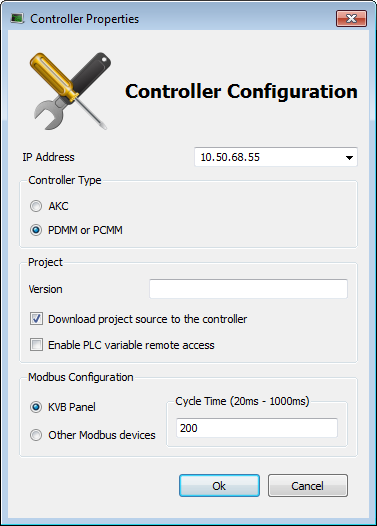
The controller is configured using the Controller Properties dialog box.
Figure 4-5: Configure the Controller Properties
To set-up the controller:
 A note about addressing
You must ensure that controller is accessible by the KAS IDE"Integrated development environment" An integrated development environment is a type of computer software that assists computer programmers in developing software. IDEs normally consist of a source code editor, a compiler and/or interpreter, build-automation tools, and a debugger machine (see FAQ section for IT issues)
You must select the correct Controller type before compiling your application (the PLC"Programmable Logic Controller" A Programmable Logic Controller, PLC, or Programmable Controller is a digital computer used for automation of industrial processes, such as control of machinery on factory assembly lines. Used to synchronize the flow of inputs from (physical) sensors and events with the flow of outputs to actuators and events code generated for the AKC(PAC"Programmable Automation Controller" PAC is a compact controller that combines the features and capabilities of a PC-based control system with that of a typical programmable logic controller (PLC). A PAC thus provides not only the reliability of a PLC, but also the task flexibility and computing power of a PC. Additionally, because they function and communicate over popular network interface protocols, PACs are able to transfer data from the machines they control to other machines and components in a networked control system) and PDMM or PCMM have different endianness). A warning is displayed if you try to start your application with an incompatible Controller type.
Versioning can be useful when you make improvements to your application and need a version control system (Use a Version Control System). The version is saved in your project file. When you make a build for an AKC(PAC), it is also saved in the versinfo.xml file saved under the Application folder.
Be sure to recompile the application before downloading it to the controller.
|
Stay Connected with Kollmorgen       
|
Copyright © 2015 Kollmorgen™ |

|